What is Appium?
Appium is an open-source automation mobile testing tool, which is used to test the application. It is developed and supported by Sauce Labs to automate native and hybrid mobile apps. It is a cross-platform mobile automation tool, which means that it allows the same test to be run on multiple platforms. Multiple devices can be easily tested by Appium in parallel.Appium is a mobile application testing tool that is currently trending in Mobile Automation Testing Technology.
Appium is used for automated testing of native, hybrid, and web applications. It supports automation test on the simulators (iOS) and emulators (Android) as well as physical devices (Android and iOS both). Previously, this tool mainly focused on IOS and Android applications that were limited to mobile application testing only. Few updates back, Appium declared that it would now support desktop application testing for windows as well.
Appium is very much similar to the Selenium Webdriver testing tool. So, if you already know Selenium Webdriver, Appium becomes very easy to learn. Appium has NO dependency on mobile device OS because it has a framework that converts the Selenium Webdriver commands to UIAutomator and UIAutomation commands for Android and iOS respectively, that depends on the device type rather than the OS type.
It supports several languages such as Java, PHP, Objective C, C#, Python, JavaScript with node.js, and Ruby, and many more that have Selenium client libraries. Selenium is the backend of Appium that provides control over the functionality of Selenium for testing needs.
Features of Appium
- Appium does not require application source code or library.
- Appium provides a strong and active community.
- Appium has multi-platform support i.e., it can run the same test cases on multiple platforms.
- Appium allows the parallel execution of test scripts.
- In Appium, a small change does not require re-installation of the application.
- Appium supports various languages like C#, Python, Java, Ruby, PHP, JavaScript with node.js, and many others that have Selenium client library.
Advantages of Appium
- Appium is an open-source tool, which means it is freely available. It is easy to install.
- It allows the automated testing of hybrid, native, and web applications.
- Unlike other testing tools, you do not need to include any additional agents in your app to make Appium compatible with automation. It tests the same app, which is going to upload in App Store.
- An additional feature added to Appium. Now it would support desktop application testing for windows as well along with mobile application testing.
- Appium is a cross-platform, freely available mobile testing tool, which allows us the cross-platform mobile testing. This means you can test on multiple platforms (single API for both Android and IOS platforms).
Disadvantages of Appium
Along with some features and advantages, Appium has some drawbacks too, which are as follows-
- Lack of detailed reports.
- Since the tests depend on the remote web driver, so it is a bit slow.
- It is not a limitation, but an overhead that Appium uses UIAutomator for Android that only supports Android SDK, API 16, or higher. However, Appium supports older APIs, but not directly. It uses another open-source library Selendroid to support older APIs.
- In iOS, only one instance (iOS Script) can run on one Mac OS device, which means one test can be executed at a time per Mac. If you want to run your tests on multiple iOS devices at the same time, you need to arrange the same number of Mac machines. But it would be expensive to arrange various Mac machines.
Solution: This problem can be resolved if you will run your script in the mobile cloud of Sauce Lab. Currently, it allows scripts to run on multiple iOS simulators at the same time.
Appium Architecture
Appium is an HTTP server that is written in node.js. It starts a “test case” on the device that gives rise to a server and listens for proxied commands from the main Appium server. Tester writes the Test scripts to execute on device or Emulator. Several webdriver sessions for different platforms like Android and IOS are created and handled by the Appium.Test Scripts written by the tester executes on the Emulator or device by sending them as requests to the Appium server. Each vendor, such as IOS or Android, has a different method and mechanism to execute test cases on the device. So, the test case executes after listening commands from the Appium server. Appium uses JSON wire protocols to send command requests to Appium server.
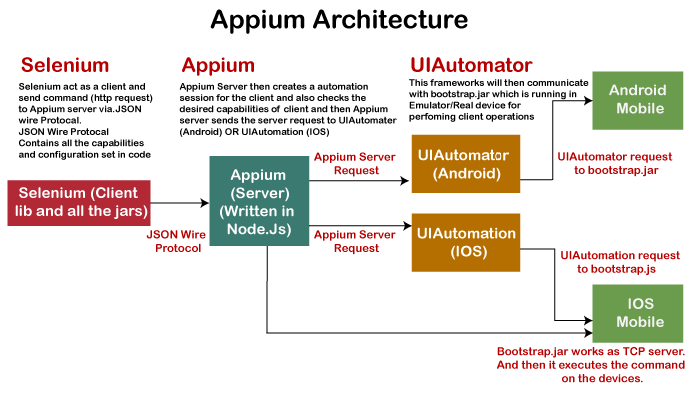
How Appium work?
- When we install the Appium, a server is also installed with it on our machine that exposes the REST API.
- It receives command and connection requests from the client and executes that command on devices like iOS or Android.
- It replies with the HTTP responses.
- To execute requests, it uses a mobile test automation framework to run the user interface of the app. For Example –
- Apple instruments used for iOS
- Selendroid used for Android API 15 or less
- UIAutomator used for Android API 16 or higher
Appium in Android
On Android, Appium proxies the command to a UIAutomator script running on the device. UIAutomator is a native UI automation framework of Android that allows you to run Junit test cases directly into the device using command line. Although it uses Java programming language, but Appium allows to run it from any WebDriver supported language.
Android uses bootstrap.jar, which works as a TCP server. It is used to send the test commands to perform the actions on Android device using UIAutomator.
Appium in iOS
As Android uses UIAutomator, iOS uses UIAutomation. Similar to the Android, Appium proxies the command to a UIAutomation test case running on the Mac instruments environment. Apple provides this application “instrument” that performs various activities like building, profiling, and controlling iOS apps. On the other hand, it also has an automation component where you can write commands in JavaScript. It uses UIAutomation API to interact with Application UI. Appium uses same libraries to automate iOS Apps.
Types of Mobile Applications
As we discussed earlier, Appium has the ability to deal with all sorts of applications, i.e., native, hybrid, and web. Let’s understand them in details –
Native Applications
Native applications are software programs that are developed by keeping a certain platform in mind. These applications are developed using a specific software development kit. Native apps are developed for use on a specific device and can be installed from the App Store, such as Google Play Store or Apple’s App Store. They can work offline and can also use the device notification system.
Web Applications
Web applications are not real applications, they are websites that run on browsers. These applications are developed using HTML, CSS, and JavaScript at a very low price. Unlike Android and iOS apps, they do not require a Software Development Kit (SDK) for developers to work with. Web applications are not developed for a particular platform. Since the web applications run on web browsers, they don’t require any installation.
Some web application examples are – Flipkart, Ali Express, twitter, etc.
Hybrid Applications
Hybrid application is a combination of native and web applications. Like native applications, these applications can be downloaded from the App Store and also can take advantage of device features, but actually they are web applications inside. They are developed using web development languages – HTML, CSS, and JavaScript like the hybrid app, which allows them to run on any platform.
Some hybrid application examples are – OLA, Instagram, Basecamp, etc.