Transaction line use directly impacts your Netsuite service tier because of how Netsuite’s service tiers scale with use. Simply put, the more transaction lines you use, the higher your service tier will be. For this reason, it’s critical to have a clear understanding of the distribution of transaction lines across the types of transactions you create. Understanding this data can help you identify opportunities to reduce transaction use and can have a tangible impact on financial costs relating to your Netsuite service tier. In this blog we’ll look at what tools are available for monitoring transaction line usage and provide a use case for reducing usage if you have standard costing enabled.
The Netsuite Service Tier Structure
Netsuite outlines the service tier structure in a table below:
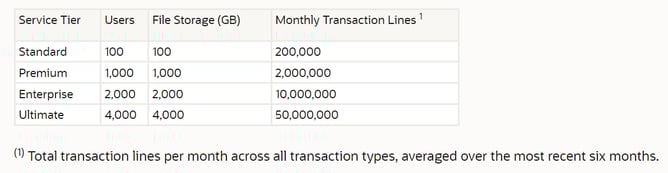
As you can see, the service tier scales broadly with use. For example, from Standard to Premium, you are seeing transaction use allotment increase by a multiple of 10. In some cases, this increase may not be warranted, and further analysis is needed in order to validate the change as necessary.
Analyzing Transaction Line Use
Using Suite Analytics, we can gain a better understanding of our transaction line use and what is distributed again. Are there opportunities to reduce certain transactions? Are certain transaction types unnecessarily driving up transaction line use? These are a few questions to keep in mind as we look at the data. Fortunately, Netsuite provides a tool to this, free of charge. The SuiteSuccess Service Tiers Metrics Workbooks SuiteApp can be installed and offers a workbook and dataset for analyzing transaction use.
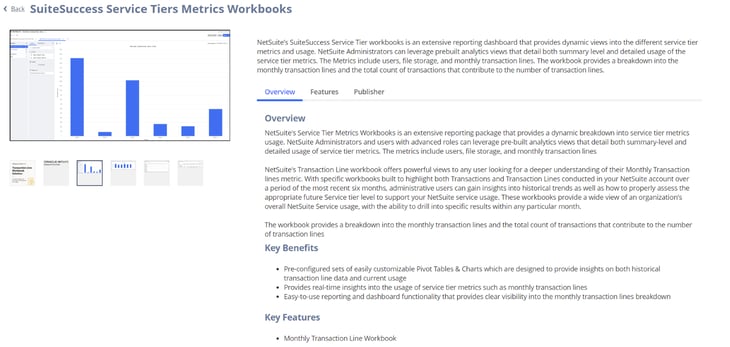
After installing the SuiteApp, head over to your Analytics module and access the Monthly Transaction Lines Workbook. This workbook, designed by Netsuite, offers a view into transaction use overtime, and can be customized to list a breakdown of transaction use by type of transaction