You can use the Login Audit Trail, which includes each session listed by the date and time of the initial login and logout entries of your users. Although there is no field to verify or calculate how long each user spent in NetSuite, you can check the date and time when the user logged in and out of NetSuite.
Please add the Details field to the Results tab. See sample below.
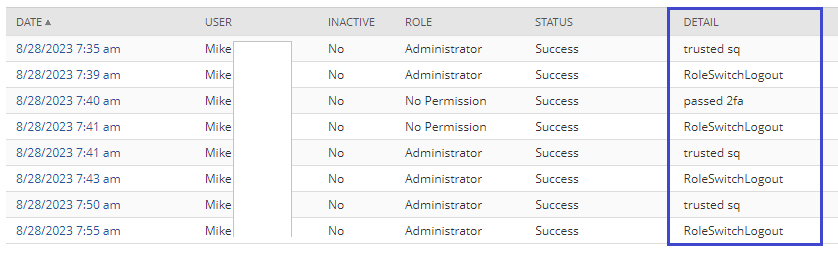
Yes, the Date and Time field is the login or login time. Please see the definitions of the following details:
- ExplicitLogout – A value in the Detail column that indicates the user clicked the Log Out link in the NetSuite UI and the active session was terminated.
- RoleSwitchLogout – A value in the Detail column that indicates the user switched to a different role in the account, or to a role in a different account. Switching roles terminates the session and is considered a logout.
- SAMLIdPInitiatedLogout – A value in the Detail column that indicates the SAML Identity Provider initiated a logout and the NetSuite UI active session was terminated.
Here are the SuiteAnswers articles related to the Login Audit Trail.