- SuiteScript execution can be monitored and audited using script logs. Script execution details can be viewed on the Script page, the Script Deployment page, and the SuiteScript Debugger.
- A list of all records that have a user event script or a client script associated with a record can be viewed on the Scripted Record page.
- And, the Application Performance Management (APM) SuiteApp can be used to view and manage the performance of NetSuite customizations and business critical operations.
Using the Script Execution Log Tab
Script execution details are logged on the Execution Log tab included on the Script page, Script Deployment page, and SuiteScript Debugger. These logs are searchable, and you can customize views to find specific logs. The Execution Log tab displays all dates and times in the local time zone set in the user preferences. Script Execution log tab in Script Deployment page is shown below.
The following figure shows two types of execution logs for a Suitelet.
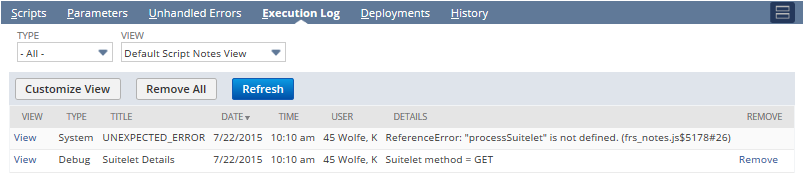
The first one is an unexpected error that is generated because a method was not defined in a Suitelet script. The second one is a user-generated execution log that is generated by the following line(s) in this Suitelet code using the SuiteScript 2.0 N/log Module:
log.debug({
title: 'Suitelet Details',
details: 'Suitelet method = ' + request.getMethod()
});
By default, the View list on the Execution Log tab is set to Default Script Notes View. This default view shows all log types from the current day’s script executions.

To view script executions for days other than the current day, click the Customize View button. Specify search criteria such as script execution dates, details, names, and script types, and then name your custom view in the Search Title field, as shown here:
